
Keeping your devices safe online shouldn’t feel like navigating a complex maze. Behind every smooth download and safe click lies a quiet protector working hard behind the scenes to keep malicious code away from your personal data.
Having spent over a decade testing security tools and inspecting endpoint protection systems, navigating the fast-paced world of malware detection has become second nature. Understanding how antivirus software works helps you choose the right tools to protect your devices, secure your sensitive files, and keep your overall system running smoothly without unnecessary lag.
Core Detection Methods Used by Modern Security Systems
Modern security tools act like vigilant digital security guards that never sleep. They constantly observe active processes running in your device’s memory, monitor incoming network traffic, and scan every new file stored on your drive. When you download a document or launch a new program, your security tools step in instantly to verify that the incoming data is safe for execution.
The software breaks down raw files into digital code and analyzes them against established security rules. If the data passes inspection, your application opens normally without delay. However, if the file exhibits suspicious traits, the software halts execution immediately, isolating the payload to shield your underlying operating system from potential harm.
Signature-Based Detection Mechanics
This traditional foundation serves as an efficient digital fingerprint matching system. Every known virus possesses a distinct code structure known as a cryptographic hash or file signature. When a scan initiates, the software calculates the file’s unique checksum and compares it against a massive database containing millions of recorded threat signatures.
This traditional approach processes thousands of everyday files in milliseconds while using minimal processing power. However, because signature matching only flags previously cataloged threats, cybersecurity providers now pair it with advanced inspection techniques to catch brand-new attacks.
Heuristic Analysis for Catching Variants

Catching modified or undiscovered viruses requires analyzing code structure rather than relying solely on exact database matches. Heuristic analysis scans files for suspicious characteristics, unusual code structures, and structural traits commonly used by malicious actors.
Instead of searching for an exact fingerprint, the software evaluates overall code sequences for red flags, such as attempts to modify core system files or disable default security features. If an application’s risk score exceeds a safe threshold, the antivirus flags the file as a potential variant and halts execution before infection occurs.
Behavioral Monitoring for Real-Time Shielding

Watching how applications interact with your operating system in real time helps uncover hidden, fast-moving threats. Behavioral monitoring tracks active processes to spot anomalous actions as they happen on your screen.
For example, if a basic utility suddenly attempts to encrypt personal documents or access stored account credentials, behavioral protection intervenes immediately. By focusing on real-time actions rather than static code, behavioral engines successfully neutralize ransomware and fileless malware before any damage takes place.
Cloud-Based Detection and Real-Time Intelligence
Because thousands of new malware strains appear daily, modern tools rely on cloud databases to provide instant threat analysis. Instead of storing massive definition files directly on your local hard drive, light software agents send suspicious file hashes to secure cloud servers for instantaneous evaluation.
This cloud-first approach allows your antivirus to spot global threat trends in seconds while keeping local storage light. It ensures your machine stays fully protected against the latest digital hazards without taking up heavy system memory or dragging down overall processing speeds.
Security dashboards must also account for mobile vs desktop web design, since scan controls, alerts, reports, and account settings need to remain clear and usable across different screen sizes.
Sandboxing Suspicious Files Safely
Isolating high-risk files inside a temporary virtual environment reveals their true intentions without exposing your main system to danger. Some advanced cyber threats hide their malicious code until they are fully opened by an unsuspecting user.
To catch these stealthy threats, modern endpoint tools execute unknown applications inside a restricted virtual environment called a sandbox. Inside this isolated area, the file runs as if it were on a real machine while security software logs every registry edit, network request, and file modification to ensure complete safety.
What Happens When a Threat Is Found?
Finding a suspicious file is only the first part of the job; stopping its spread across your machine is where automatic intervention steps in. When your security software identifies a dangerous file, it revokes the application’s execution privileges, severing its connection to your operating system to prevent it from running background commands or communicating over your home network.
The software then chooses the best course of action based on the severity of the threat and your predefined security rules. Whether the file is locked away or wiped out entirely, your system remains stable while the threat is safely processed.
Quarantine Protocol for Safe Isolation
Quarantine isolates an infected file in a secure, restricted folder on your hard drive. The antivirus encrypts the file and restricts all system permissions, keeping the program entirely inert so it cannot execute or infect neighboring directories.
This holding area gives you total control over how the threat is handled. It retains the isolated file safely in case you need to review it later or restore a harmless program that was flagged by a false positive.
File Deletion for Complete Removal
Deletion completely wipes the dangerous file from your storage drive to protect your system. When a file is identified as a known, high-risk threat with zero utility, the antivirus shreds its data to ensure no traces remain behind.
This definitive action removes the malicious payload permanently, freeing up storage space and ensuring the threat can never re-emerge or execute on your device in the future.
Optimize Your Antivirus Software Settings for Peak Performance
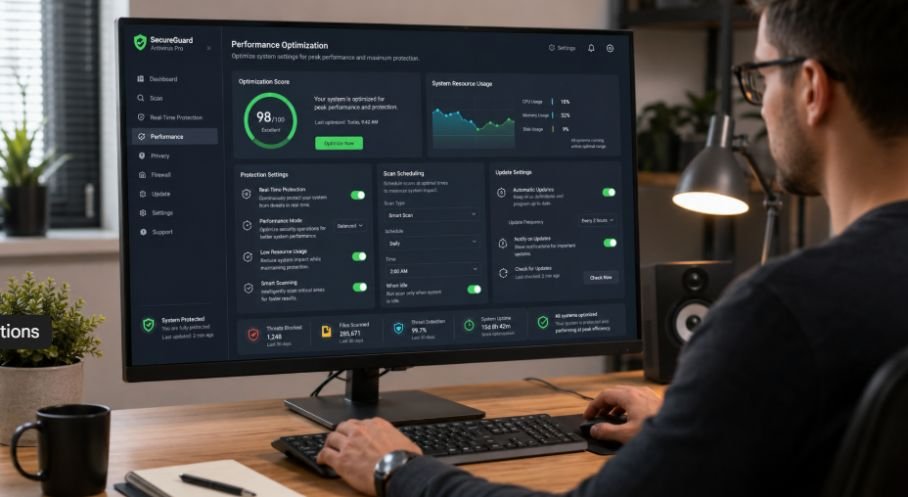
Configuring your protection tools correctly ensures maximum device security without creating annoying performance delays.
Following a clear, step-by-step optimization routine helps balance strong real-time security with smooth everyday computing.
A well-organized security dashboard also depends on understanding the difference between UI and UX design, since clear controls, readable alerts, and intuitive navigation help users configure protection settings without confusion.
- Enable Automatic Cloud Updates: Configure your security software to download real-time threat intelligence updates automatically so your protection rules stay completely current.
- Schedule Off-Peak Scans: Set deep system scans to run during overnight hours or off-peak times to avoid CPU slowdowns while you work or game.
- Activate Web and Email Shields: Turn on browser extensions and email scanning features to filter out malicious links and infected attachments before they land on your drive.
- Configure Quarantine Alerts: Set your software to send immediate notifications whenever a file is isolated so you can review potential false positives right away.
- Set Up Folder Protection: Restrict untrusted applications from altering critical document folders to defend your private files against unauthorized encryption.
Comparing Traditional Antivirus with Modern EDR Platforms
Understanding how endpoint protection tools have evolved helps you choose the right defense for your personal or business needs. Traditional antivirus solutions focus primarily on preventing established file-based infections on single devices, excelling at blocking automated commodity malware using local databases and static file inspection.
Next-generation Endpoint Detection and Response (EDR) platforms go far beyond basic file scanning. Built for enterprise networks and complex technical environments, EDR continuously logs deep system telemetry, tracks process relationships, and provides security analysts with interactive tools to isolate infected hosts across an entire organization.
Frequently Asked Questions
1. Do you actually need antivirus software?
Yes, every connected device needs active protection against modern digital threats. Built-in operating system security tools and dedicated third-party antivirus software defend your system from drive-by downloads, zero-day exploits, dangerous scripts, and ransomware attacks targeting your sensitive personal information.
2. How does the antivirus software work?
Antivirus software works by constantly scanning your device’s files, memory, and incoming traffic. It compares what it finds against known malware fingerprints while monitoring system activity for abnormal behavior to proactively block, quarantine, and remove malicious programs.
3. What is the disadvantage of antivirus?
The main disadvantages include potential performance slowdowns during full system scans, occasional false positives that flag safe software, and background resource usage on older hardware when running continuous real-time protection shields.
4. What are the 4 types of antivirus software?
The four primary types include traditional signature-based antivirus, heuristic and behavioral-based protection engines, cloud-based security agents, and enterprise-grade Endpoint Detection and Response (EDR) platforms designed for complex network environments.
Unlocking Total Digital Peace of Mind!
Understanding how does antivirus software work transforms basic computer maintenance into a powerful defense strategy. Combining signature checks with behavioral monitoring and cloud analysis ensures your devices stay resilient against changing online threats.
Keep your software updated, run routine system checks, and navigate the web with complete peace of mind knowing your digital life is fully protected.